

Most B2B buyers won’t book a demo until they know what it costs. Can I afford this? Is it competitive? How does it scale? They want answers before they give you their time.
The data backs it up:
16.5% of all visitors end up at your pricing page
1.7x more pipeline per lead from transparent vs gated pricing
51% of B2B buyers say transparent pricing is their #1 wish
So everyone should have a pricing page. Right?
Transparent pricing: The tinderbox-discussion like no other
Having advised 50+ SaaS companies and being internally responsible for marketing and growth at 3, I know the pricing-on-the-website-discussion really drives internal divides and resistance like few other things.
Some think pricing belongs at sales as a tool in the conversation.
Sometimes the packaging is not good enough to show publicly.
Or pricing is just about to change, so let’s wait a bit (another year at least…).
No matter the reason, getting everyone onboard with showing transparent pricing is harder than steering a parked car.
But you still want to serve the buyers as they want to be served and grab that extra pipeline from the traffic you worked so hard to get.
So we have to answer the buyer question: “What does it cost?”.
What to do then? How do you fill the gap of pricing without being able to put up a pricing page?
I got you.
7 ways to show pricing without actual pricing
Before giving you the 7 tactics, here is a titanic-size battlecry: You should fight for transparent pricing. Nothing in this guide will help you as much as just showing your damn price to buyers who wanna buy from you.
This is NOT a replacement for doing the work. These are tactics for when you for some reason really can’t show your pricing or you have to bridge now to later when it’s possible.
With that said: doing some of these tactics instead and seeing for yourself how many people use the pricing page and how it affects the buyer’s journey just might be the thing that gets you enough power to prove your point.
Think of it like this:
Most people just want an indication. Is this $50-monthly-per-seat-software or are we looking at a $50.000 yearly write out with a 3-year commitment.
So even when you aren’t totally transparent, you can give directional guidance that actually helps people over the hump so they jump on a call to get the specifics.
That’s how these tactics work.
And now to what you came for:
7 ways to have a pricing page without real pricing
1. The feature columns
You know those classic pricing pages with three columns? Starter, Growth, Enterprise. Do that, but leave out the prices. Show the tiers, show what’s included in each, stack those beautiful checkmarks.
This works because buyers don’t only care about the price.
They care about what they get.
And when they can see the difference between your tiers, they start to self-select. “We definitely need SSO and dedicated support, so we’re looking at Enterprise.”
Now they walk into the sales call knowing what tier fits them. That conversation is much easier.
You can even add a little note under each tier like:
“Custom pricing based on team size — talk to sales”
“Starting from $X/month — get a quote”
Or just gate-slap the buyer with the OG: “Get a quote”.
Why it works: This setup makes it feel like a real pricing page (just without pricing). It lets buyers do the mental work of figuring out what they need before they even talk to you. They arrive at the sales call pre-qualified and with a clear idea of the tier they want. You’ve already anchored them. And you’ve shown them that there is structure to your pricing, even if you didn’t reveal the numbers. That builds trust. Way better than a blank page that just says “Contact us.”
Real-life examples:
https://www.command.ai/pricing/
https://www.vanta.com/pricing
2. The ballpark range
Take all invoices you shipped the last year and rip out 10% of the lowest paying customers and 10% of the highest paying customers. That should give you a good median to work with.
Take all the invoices you have left and drop them into a sheet and hover the bottom half and see the average.
Then do the same with the top half to get that average. Then you have an output that looks something like this:
“Our customers pay us between $11.400 and $87.000 yearly depending on features and usage”
You can also just drop all your invoices into your favorite AI and prompt it to give you the answer way faster.
Why it works: You just gave people two numbers to work with and depending on their business size they have a hunch about where they will land. For some, that is enough to move on.
Real-life examples:
I could not find a pricing page example. Almost no one does this on their pricing page, but it’s a very used Enterprise software tactic that sales reps use a lot.
3. The floor price
Tell your buyers your minimum and go from there. Especially if you are higher in price point. Nothing worse than thinking of a price and then getting totally blindsided when they mention the real pricing. That reminds me...
I was in love with Copy.ai and was doing my due diligence in the process. Their pricing page tells you that it costs $249 per month and then you have 10.000 credits to use. I figured there probably was coming an extra add-on for more credits, but I ventured into the sales process. In it I learned it was not $249 per month. In fact, their lowest tier for helping with setup was $24.000 yearly.
Imagine me scraping money from other initiatives in my marketing budget to find $5.000, walking proud and buying-ready into that meeting and then being told it’s 5x that amount. F*ck off (but nice product though).
“Our pricing starts from $3500 for our standard suite with video self-onboarding”.
You could also add tiers here.
Start-up: Starts from $100
SMB: Starts from $1.000
Enterprise: Starts from $10.000
You see it a lot paired with the feature columns and seat pricing.
Why it works: The buyer gets a minimum that they can hold their budget against. It gives an indication about pricing and tells you it will be more expensive but it depends from here on out. And that alone will scare away cheapskates from your pipeline and hogging your sales reps’ time on tire-kicking.
Real-life examples:
https://www.twilio.com/en-us/flex/pricing
https://segment.com/pricing/connections/
https://www.databricks.com/product/pricing
https://www.askcody.com/pricing
4. The scaling customer
You can use a customer example to make it look super sharp. This will not only answer the question of price now, but also as you scale.
A sneaky advantage here is you can sneak in their outcome and make a really cool ROI comparison to make it look cheap. If you can name the company it’s a mini case story in itself and would be preferred.
“A 3,000-person pharma company has been a customer for 3 years. Here’s their breakdown:”
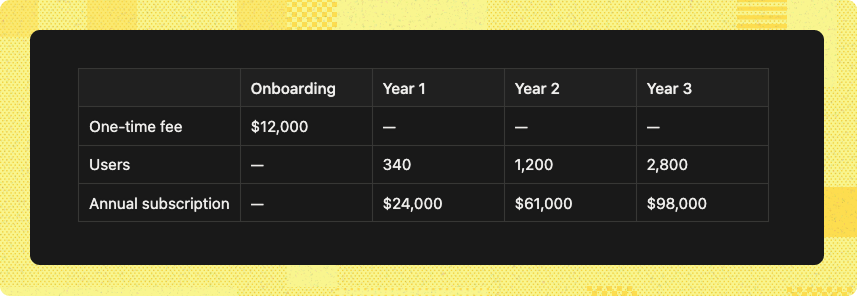
Total 3-year investment: $195,000
Their outcome: 14% faster time-to-hire and $2.1M saved in agency fees.”
Pro tip: Watch out for buyer-fit here. If you put out a number for a too small or too large organization compared to your average buyer, you scare them off. You want to use a customer story that has the median buyer-fit.
Why it works: This creates a believable setup where buyers can see how a company scales with your product. It shows the onboarding cost as a separate line item, then how the subscription grows with usage over time. If you’re running usage-based pricing, it can be really hard to understand before you’re onboarded. This makes it tangible.
Real-life examples:
This one is rare. You’ll find scaling stories in case studies, but almost never on pricing pages. And most you’ll find are hidden in doc sites.
https://launchdarkly.com/docs/home/account/calculating-billing
https://docs.snowflake.com/en/user-guide/cost-understanding-overall
5. The Price of not buying
This one is an absolute fav tactic of mine. Even if you have a pricing page, you should create this math to show the downside of not buying.
In this tactic, you outline the cost of time/spend/income of current solution and compare it to what it will be if they switch to your software.
Let’s say you sell time management software in consulting. Create a comparison of all the good stuff you help optimize: Time per tracked task, lost hours to registering fails and more.
Then you add the economy of it into it and have a great piece of content to convince people why it’s a smart choice to switch out your old solution.
SaaS’s biggest competitor is still Excel sheets.
It looks something like this
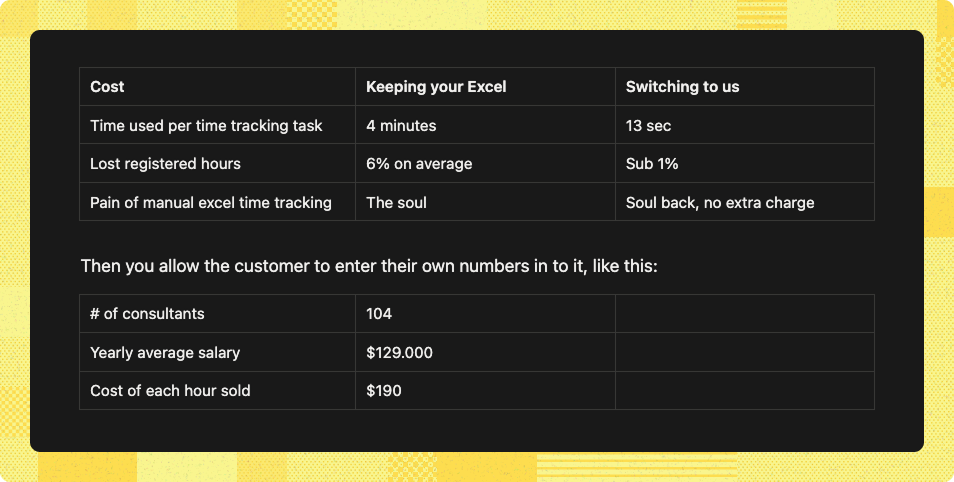
And with those numbers you can now write:
“With us you will easily save 800 manhours, bill $32.000 extra on used hours and save countless pained souls from Excel. Switch and get happy employees, more time and cash back. Get a quote”
Pro tip: Sometimes people don’t know the exact number of what you are asking, so they won’t fill it out. So pre-fill it with some numbers, so they can still get an output.
Vibe-code it in minutes
If you feel you don’t know how to build this, just vibe-code it. Your AI code tools like Loveable, make it laughably simple to build what was once complex.
And you should definitely put that on your pricing page as well. See here how easy it is to vibe-code things like this (or on YouTube)
It also has a bigger brother as the next tactic.
Why this works: It gives a clear image of how this will earn itself back and then some. If this maths holds true, the price is not really the big problem. But maybe timing of price will be. It’s hard to charge a year upfront when they didn’t have this expense before. So play it smart with how you charge if you use this tactic. Savings don’t equal having those savings upfront to pay you.
Real-life examples:
BetterCloud ROI Calculator
6. The payback math
This one is the big brother of “The Price of not buying” but with a different angle. Instead of showing what you’re losing by not switching, you show what you’ll gain by buying.
Different psychology. Some buyers respond better to “stop the bleeding,” others to “unlock the upside.”
Let’s say you sell sales enablement software. The kind that helps reps find the right content at the right moment and close deals faster.
You ask the buyer to fill in a few numbers:
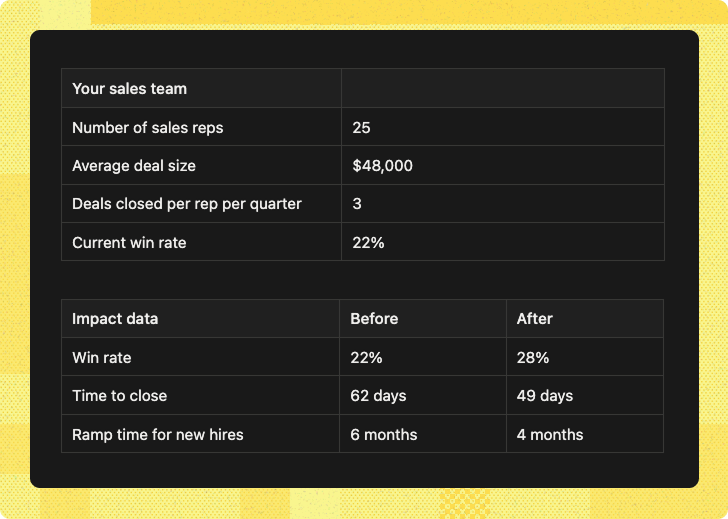
And the output becomes something like:
With a 6% lift in win rate, your team will close 18 more deals per year, adding $864,000 in new revenue. Faster ramp means your new hires hit quota 2 months earlier — worth another $96,000 in accelerated pipeline.
Total first-year impact: $960,000
→ Get a custom quote”
Same as “Price of not buying” — vibe-code it with Lovable or Bolt. It’s basically just math and inputs. You’re not building rocket ships here.
Pro tip: If the math is too strong it’s going to be unbelievable and then it works against you instead of for you. So make sure you have guardrails in place, even if the numbers add up. It’s better to highlight big numbers in customer stories.
The difference between “The payback math” and “The price of not buying”.
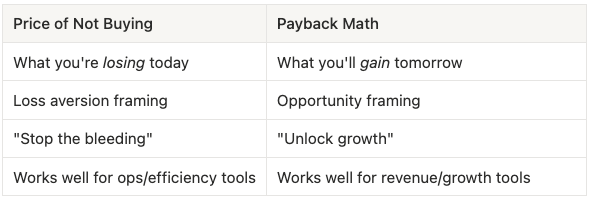
Both are valid. Some buyers respond better to fear of loss, others to promise of gain. You could even have both on the same page for different personas.
Why it works: You just made price somewhat irrelevant. If the output says they’ll make an extra million, $30k or $80k yearly is not that important. The ROI does the selling. Now it’s a game of validating the numbers for the buyer so they can see it in their own business.
Real-life examples:
HubSpot ROI Calculator
Zendesk ROI Estimator (301% ROI based on Forrester TEI study)
7. The pricing logic
Sometimes your pricing is just too complex to slap a number on. Usage-based pricing, credit systems, or custom enterprise deals. Instead of hiding everything, explain how pricing works.
“We charge based on three things: the number of users, API calls per month, and data storage. The more you use, the more you pay — but volume discounts kick in at scale.”
You show a few numbers but never the full amount. Instead, you’ve told buyers how to think about their bill. That’s often enough for them to continue the conversation.
But I would still combine this with “The floor price” or “The scaling customer”.
Why it works: Buyers don’t always need to know the exact price. They need to understand the logic. When they get it, they can mentally model what their spend might look like. And that removes the fear of being blindsided.
Real-life examples:
https://betterstack.com/pricing#logs
https://newrelic.com/pricing
https://posthog.com/docs/billing/estimating-usage-costs
Quick reference
Here’s all 7 at a glance. Pick based on what you have and what the buyer needs to know.
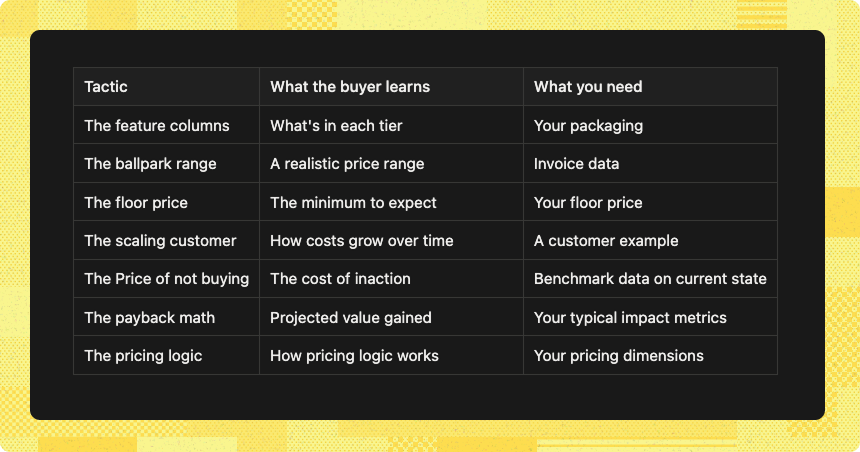
Stack the tactics
These tactics work alone, but they work better together. The trick is to pair structure with numbers. Structure shows what they get. Numbers show what it costs.
Here are three combos that work well:
The Classic
Feature columns + The floor price
Show buyers what’s in each tier, then anchor them with a starting number. Structure meets price. This is the closest you get to a real pricing page without showing transparent pricing.
The Believer
The pricing logic + The scaling customer
Explain how your pricing works, then prove it with a real customer journey. Logic meets proof. Great for usage-based pricing that’s hard to understand upfront.
The Justifier
The floor price + The payback math
Anchor them with a starting number, then show them the value they’ll get back. Price meets ROI. Great when you want to lead with cost but need to prove it’s worth it.
Helpful? Yes. Optimal? No
These tactics help you play defense. If you wanna play offence, you have to have public, transparent pricing.
And buyers will find your pricing anyway.
Try this: Go into your favorit AI and ask
“How much does 6sense cost?”
The danger is buyers will base their number on something that could be totally off from how you set your pricing today. But they run with it because you don’t give them an alternative.
Remember the opening: your pricing page gets 18x more traffic than your demo page. That’s 18x more chances to win or lose a buyer.
If you’re stuck on what to show, I can help. Transparent pricing is one of my services at lowfriction.io.